Run Multiple Claude Code Sessions From a Stream Deck (Full Demo)
claude-codestream-deckhardwareai-agentsmulti-agentworkflowzellijdictation
Verdict: Jesse runs every client work stream from a Stream Deck XL that Claude configures, with one press to reopen a Claude Code thread, two to rehydrate it from a saved prompt and three to close it, at the cost of far more tokens
TL;DR
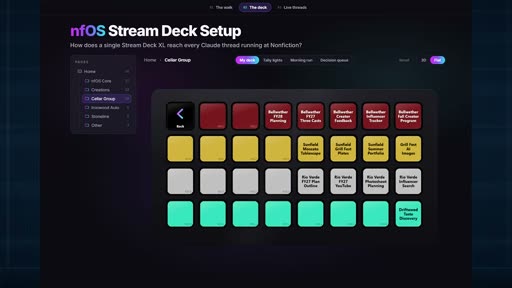
- Jesse, co-host of Not Replaced Yet with their brother Nick (Sept 2026), runs the agency's client work from an Elgato Stream Deck XL. Each client gets a folder of keys, one per work stream, and each key opens its own Claude Code thread in PowerShell.
- The keys work by click count. One press goes back to the existing thread, which zellij keeps alive. Two presses clear the thread and restart it from a saved prompt that fetches the context again; Jesse calls this rehydrating. Three presses close the stream out and reorder the keys.
- The deck sat unused for months until Jesse realized Claude could handle the settings. Claude now manages the whole Stream Deck configuration without the Stream Deck app, and it also built the layout page used in the demo.
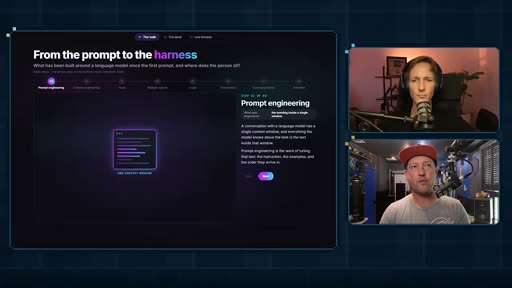
- Jesse places the deck at step seven of a ladder: prompt engineering, context engineering, tool calling, agents, swarms and loops, the harness, and then a control surface for that harness.
- Jesse reports far more tokens (a weekly cap used up in about two days), less context switching, and inbox zero almost every day for the first time.
Full summary
Personalized hardware
Earlier episodes covered personalized software, built for one person's needs, and Nick opens by arguing that the same approach makes personalized hardware possible. Both hosts have a long history of building computers and modding phones, and Jesse uses a hardware controller to work with AI. Nick hasn't looked into it yet, so the episode is Jesse's demo with Nick asking questions. Jesse warns that the subject is approachable but very nerdy.
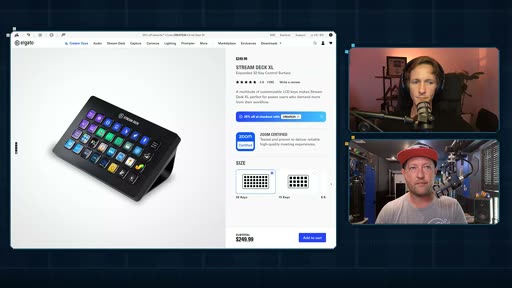
A Stream Deck is a macro keyboard with customizable LCD keys; people use it for video editing and other media work. Jesse traces the appeal back to IRC scripts and to the Nintendo Entertainment System, "when the buttons just did what you wanted." A phone shot shows the physical deck on Jesse's desk, with client names removed, which was easy because Claude controls the configuration. Jesse calls it the control panel for NFOS, the system Jesse built for the agency. It sat unused for months, bought on a whim or received as a gift (Jesse can't remember which), until it occurred to Jesse that Claude could handle all the settings. The work wasn't hard, but dialing it in took time Jesse had never spent.
From prompt to harness
Before the demo, Jesse walks through a ladder of how working with AI has grown, on a page Claude built called "From the prompt to the harness":
- prompt engineering, where everyone started a few years ago
- context engineering, bringing in several sources of context
- tool calling, which gives you an agent
- many agents at once (swarms) and the loops they run to get work done
- the harness, the orchestration layer over agents that call tools and use context
- the control surface for that harness, which is what Jesse is optimizing now
Jesse has any number of agent threads running in NFOS and needs to move between them. Jesse, who comes from video, compares moving between them to a broadcast switcher: a director calls for camera two and someone presses the button. Nick likes the linear framing and calls step seven an abstraction layer: a lot sits under one button press, and the person has to think through what they want before handing it to Claude Code, which sets it up. Jesse mentions an eighth step about behavioral psychology (cognitive load theory, context switching) but doesn't cover it.
A key per work stream
The layout page, also made by Claude, shows the deck flat (a 3D view exists). Jesse works in plain PowerShell, not Cursor or Visual Studio. The keys are nested folders: a client, here the hypothetical "Cellar Group", has several work streams that Jesse moves between asynchronously. Most of Jesse's agent work is operations: updating database records with project status, connecting vendors and supervising invoicing. Nick points out that pitch decks and invoices are code output too, and Jesse agrees but says it is heavily templated: copy, paste, change a value.
Each key responds to how many times it is pressed:
- One press opens PowerShell on that stream's existing thread. zellij, which Nick introduced Jesse to, keeps the thread alive, so there is no hunting for bookmarks or passwords.
- Two presses clear the thread and start it again from a prompt stored in the Stream Deck configuration. Asked by Nick to define rehydrate, Jesse explains that the prompt sends the fresh session to fetch what it needs, for example checking email or checking for updates, so it is back up to speed. Nick sums it up as a series of tasks followed by the interactive session.
- Three presses close the stream out, remove its key and reorder the rest.
A "new creation" key opens PowerShell in the right repo for the agency's free-form HTML outputs. Jesse barely manages the deck by hand, and when changes are needed Claude does them. The saved prompts live in the Stream Deck's configuration, all edited without the Stream Deck app, which Jesse calls burying the lede.
Voice, structure and tokens
The other half of the control surface is voice: Jesse dictates most of the day, and both hosts say they type less than ever. Nick uses Wispr Flow, which stopped working for Jesse a year ago, so Jesse switched to WhisperTyping. Nick's advice: talk to your agents instead of typing to them most of the time.
Laying out the keys also made Jesse decide "the granularity of how I spend my time professionally," which Jesse says most people never stop to do. The downside is tokens. With more open threads and less friction, Jesse hits the weekly cap of a Max plan running Fable in about two days of moderate use, and concludes that removing friction raises token counts.
Ideas Claude drew
Asked what the deck could do, Claude drew more interfaces, which Jesse treats as inspiration. Tally lights could show session state with waveform animations; Jesse has used timers and would log them into NFOS instead of just showing a clock. A "morning run" page puts a progress bar across several keys for the morning thread, where Jesse reviews overnight automations. Jesse hasn't tried these on the physical device. Nick likes the tally lights: red for a stopped session that needs attention, green for one that is running. Jesse built a color system once and took it back out after designing themselves into a corner. The lesson Jesse draws is to try a setup, let it play out in daily work and edit it, "an infinite game." Nick's own software version, called Lights, shows each Claude Code session and the instances running under it with animated colored lights.
The payoff
Nick asks for the single most useful thing the deck has unlocked. Jesse's answer is that the deck limits the damage from procrastination: tasks and emails used to stack up while work took longer, and now Jesse is at inbox zero almost every day, which had never happened before. Jesse puts it down to less cognitive load and context switching, and says organized work is also more enjoyable. The deck went from collecting dust to Jesse's favorite thing on the desk.
Key moments
- [00:00] Cold open — Nick on personalized hardware, then Jesse on one, two and three presses over the deck page. frame_0002.jpg
- [01:31] What a Stream Deck is — a macro keyboard with LCD keys; the Elgato Stream Deck XL product page is on screen. frame_0005.jpg
- [03:08] Unused for months — the deck came alive once Claude handled the settings.
- [04:12] The ladder — prompt engineering to the harness, on a page Claude built. frame_0006.jpg
- [05:25] Step seven — control surfaces, drawn as a broadcast switcher. frame_0017.jpg
- [08:17] A folder per client — the "Cellar Group" folder, with one key per work stream. frame_0019.jpg
- [09:44] One, two, three presses — reopen the thread, rehydrate from a saved prompt, close and reorder.
- [13:38] More tokens — a weekly cap used up in about two days.
- [14:59] Tally lights and morning run — Claude's ideas for status lights and a progress bar across keys. frame_0025.jpg
- [18:23] The payoff — less context switching and inbox zero almost every day.
Hook microscope (0-10s)
-
Frames: 20 at 2 fps
Read these hook frames with the Read tool:
hook_frames/frame_0001.jpg(t=0.0s)hook_frames/frame_0002.jpg(t=0.5s)hook_frames/frame_0003.jpg(t=1.0s)hook_frames/frame_0004.jpg(t=1.5s)hook_frames/frame_0005.jpg(t=2.0s)hook_frames/frame_0006.jpg(t=2.5s)hook_frames/frame_0007.jpg(t=3.0s)hook_frames/frame_0008.jpg(t=3.5s)hook_frames/frame_0009.jpg(t=4.0s)hook_frames/frame_0010.jpg(t=4.5s)hook_frames/frame_0011.jpg(t=5.0s)hook_frames/frame_0012.jpg(t=5.5s)hook_frames/frame_0013.jpg(t=6.0s)hook_frames/frame_0014.jpg(t=6.5s)hook_frames/frame_0015.jpg(t=7.0s)hook_frames/frame_0016.jpg(t=7.5s)hook_frames/frame_0017.jpg(t=8.0s)hook_frames/frame_0018.jpg(t=8.5s)hook_frames/frame_0019.jpg(t=9.0s)hook_frames/frame_0020.jpg(t=9.5s)
-
Word-level transcript (24 words):
  [  0.06s] A
  [  0.11s] fascinating
  [  0.74s] thing
  [  1.05s] that
  [  1.30s] this
  [  1.55s] unlocks
  [  2.04s] is
  [  2.14s] personalized
  [  3.04s] hardware.
  [  4.00s] A
  [  4.11s] single
  [  4.80s] click
  [  5.39s] opens
  [  6.04s] an
  [  6.12s] existing
  [  6.61s] thread.
  [  7.00s] The
  [  7.38s] double
  [  7.66s] click
  [  8.03s] rehydrates.
  [  9.00s] It's
  [  9.30s] a
  [  9.38s] triple
  [  9.67s] click.
- 0.0s: Nick's webcam, headphones and a podcast mic in a pink-lit room: "A fascinating thing that this unlocks is personalized hardware."
- ~4-8s: Cut to the layout page Claude built ("nfOS Stream Deck Setup", the Cellar Group folder, colored keys labeled by work stream) as Jesse says "A single click opens an existing thread. The double click rehydrates. It's a triple click."
- by 11s: Jesse on camera in a red cap: "1 2 3, it puts me right at that moment of impact for work."
Pattern: a premise line from one host, then a demo-first teaser from the other, with the payoff stated before the title card. The click-count rule is given in full in the first ten seconds, so the episode can explain the why afterwards.
Editorial profile
- Shots: 14
- Cuts/min: 0.68
- Mean shot length: 112.22s
- Median shot length: 3.67s
- Talking-head ratio: n/a (opencv not installed)
Two-host remote podcast in side-by-side webcam boxes on a dark grid background, switching to a screen share with both webcams stacked on the right for the demo; a pixel-art "Not Replaced Yet" end card closes it. The scene detector missed most screen changes in the demo, so the shot numbers understate the edit.
Quotable moments
- [02:20] "when the buttons just did what you wanted."
- [10:04] "a single click opens an existing thread right to the point. So, I am just delivered to the moment where I can engage with this work"
- [13:23] "I'm thinking about the granularity of how I spend my time professionally."
- [14:23] "the more uh you remove friction from your workflows in this day and age in this space that you and I are in, token count goes up."
- [19:21] "I'm at inbox zero almost every day. That's never been the case."
Entities mentioned
- People: not-replaced-yet (Nick and Jesse)
- Companies: NonFiction (the hosts' agency), Elgato, Anthropic
- Tools / products: Elgato Stream Deck XL, Claude Code, Claude, Fable, PowerShell, zellij, NFOS (the agency's internal system), Wispr Flow, WhisperTyping, Superwhisper, Handy, Lights (Nick's session viewer), Cursor, Visual Studio
Concepts surfaced
- control-surface: step seven of Jesse's ladder, a physical or visual layer of buttons over the agent harness, so moving between threads takes one press.
- thread-rehydration: clear a thread and restart it from a saved prompt that fetches context again, so a fresh session starts from the same place every time.
- malleable-computer: Claude edits the Stream Deck's configuration directly, so Jesse never opens the vendor app; personalized hardware follows from personalized software.
- Friction and token cost: removing friction means more parallel threads, and token use rises with them.
- Work-stream granularity: laying out one key per stream forces a decision on how work time is divided.
Frame timeline
What's said while each frame is on screen.
[00:00]
A fascinating thing that this unlocks is personalized [music] hardware. >> A single click opens an existing thread.
[00:03]
A fascinating thing that this unlocks is personalized [music] hardware. >> A single click opens an existing thread. A double click rehydrates. It's a triple click. So, [music] 1 2 3, it puts me
[00:11]
A double click rehydrates. It's a triple click. So, [music] 1 2 3, it puts me right at that moment of impact for work.
[00:14]

click. So, [music] 1 2 3, it puts me right at that moment of impact for work. >> Hello and welcome to Not Replace Yet. My name is Nick Bouchcar and I'm here with my brother Jesse. Say hello, Jesse. >> What's happening, everybody? >> Not Replace Yet is the show where Jesse and I explore and explain how we work day-to-day in the age of agents and AI. We are running an agency working with clients across the globe. We are building and learning relentlessly and...
[03:07]
phone and we'll jump into the actual virtual demo. So here's the actual device that's not in a dusty corner in my office. It's got these customizable LED or LCD, I guess, keys and you can install your own shortcuts and kind of do what you want. So people use these for video editing. People use these for, you know, all sorts of media type things amongst other um use cases. Um and yeah, so this is cool, but it sat unused for months and months and months. I bought it on a whim...
[04:09]
configurations and things, just hit us up in the comments. Um so, but before I do that, I do want to just give us a quick kind of history lesson or or zoom level calibration for this because this is a really nerdy optimization layer, right? So, I'm going to go quickly through this if you're uh you know, I'll probably say something that um overgeneralizes. Uh Nick, you'll catch me in that. Um but I I just wanted to start like what is prompt engineering? Like what can you...
[20:12]
comments and until next time we will see you later.
[20:12]
comments and until next time we will see you later.
[20:12]

comments and until next time we will see you later.
[20:12]

comments and until next time we will see you later.
[20:12]
comments and until next time we will see you later.
[20:12]
comments and until next time we will see you later.
[20:13]
comments and until next time we will see you later.
[20:13]
comments and until next time we will see you later.
Transcript
Source: captions.
[00:02] A fascinating thing that this unlocks is personalized [music] hardware.
[00:04] personalized [music] hardware. >> A single click opens an existing thread.
[00:07] >> A single click opens an existing thread. A double click rehydrates. It's a triple
[00:09] A double click rehydrates. It's a triple click. So, [music] 1 2 3, it puts me
[00:12] click. So, [music] 1 2 3, it puts me right at that moment of impact for work.
[00:23] >> Hello and welcome to Not Replace Yet. My name is Nick Bouchcar and I'm here with
[00:24] name is Nick Bouchcar and I'm here with my brother Jesse. Say hello, Jesse.
[00:26] my brother Jesse. Say hello, Jesse. >> What's happening, everybody?
[00:28] >> What's happening, everybody? >> Not Replace Yet is the show where Jesse
[00:30] >> Not Replace Yet is the show where Jesse and I explore and explain how we work
[00:32] and I explore and explain how we work day-to-day in the age of agents and AI.
[00:35] day-to-day in the age of agents and AI. We are running an agency working with
[00:37] We are running an agency working with clients across the globe. We are
[00:39] clients across the globe. We are building and learning relentlessly and
[00:41] building and learning relentlessly and this is the show where we share what
[00:44] this is the show where we share what works for us for you fine internet folks
[00:47] works for us for you fine internet folks out there.
[00:48] out there. >> Well said.
[00:49] >> Well said. >> Yeah. So, in previous episodes, we have
[00:52] >> Yeah. So, in previous episodes, we have talked about personalized software where
[00:54] talked about personalized software where you can build something that is very
[00:57] you can build something that is very specific to you. A fascinating thing
[00:59] specific to you. A fascinating thing that this unlocks is personalized
[01:01] that this unlocks is personalized hardware. So, Jesse and I have a long
[01:04] hardware. So, Jesse and I have a long history of building our own computers,
[01:06] history of building our own computers, modding our phones, and just sort of
[01:08] modding our phones, and just sort of general
[01:09] general tech nerdery if that makes sense. And
[01:12] tech nerdery if that makes sense. And that has definitely not changed today.
[01:14] that has definitely not changed today. So, Jesse, he and I talk about this all
[01:17] So, Jesse, he and I talk about this all the time and he uses his own hardware
[01:19] the time and he uses his own hardware controller to interact with his AI. And
[01:23] controller to interact with his AI. And I'm very excited because I haven't
[01:24] I'm very excited because I haven't really dug into it myself. So, Jesse, I
[01:26] really dug into it myself. So, Jesse, I mean, do you want to give us a little
[01:27] mean, do you want to give us a little explanation and then I know you have
[01:29] explanation and then I know you have something to show off.
[01:30] something to show off. >> Yeah, I think the
[01:32] >> Yeah, I think the thanks for the intro, Nick. I think that
[01:33] thanks for the intro, Nick. I think that the
[01:35] the the subject matter here is like both
[01:37] the subject matter here is like both very approachable but also very nerdy.
[01:39] very approachable but also very nerdy. So,
[01:40] So, if it's not for for every audience
[01:42] if it's not for for every audience member, that's okay, of course.
[01:44] member, that's okay, of course. But what what I'm going to show off
[01:45] But what what I'm going to show off today is my Stream Deck setup. So,
[01:47] today is my Stream Deck setup. So, Stream Deck is a customizable
[01:52] Stream Deck is a customizable keyboard like a macro keyboard where you
[01:54] keyboard like a macro keyboard where you can set up shortcuts and have your own
[01:56] can set up shortcuts and have your own buttons that that trigger things. And
[01:57] buttons that that trigger things. And that's been like a cool class of
[02:01] that's been like a cool class of software and hardware like Nick said and
[02:03] software and hardware like Nick said and kind of for both of our lives is like
[02:05] kind of for both of our lives is like we've we've um played with, you know,
[02:08] we've we've um played with, you know, all the way back to
[02:09] all the way back to um like IRC and writing your own scripts
[02:12] um like IRC and writing your own scripts and things like that. Like just trying
[02:13] and things like that. Like just trying to trying to take control. And so
[02:16] to trying to take control. And so um and I mean that's why I picked the
[02:17] um and I mean that's why I picked the hat today, right? It's like we're both
[02:18] hat today, right? It's like we're both video gamers. Like this is the my
[02:20] video gamers. Like this is the my introduction was a Nintendo
[02:21] introduction was a Nintendo Entertainment System when the buttons
[02:23] Entertainment System when the buttons just did what you wanted. So I'm going
[02:24] just did what you wanted. So I'm going to show you a the physical setup here. I
[02:26] to show you a the physical setup here. I I have my phone. The quality is not
[02:29] I have my phone. The quality is not awesome, but I just want to do this
[02:30] awesome, but I just want to do this before we get into the virtual demo.
[02:33] before we get into the virtual demo. Demo here, I just want to show the
[02:34] Demo here, I just want to show the physical device. We're going to go over
[02:36] physical device. We're going to go over to the virtual demo, but this is my
[02:38] to the virtual demo, but this is my actual setup. I jump between all of my
[02:40] actual setup. I jump between all of my different uh well, it's called code in
[02:42] different uh well, it's called code in this instance. Um the system I've built
[02:44] this instance. Um the system I've built for our company is called NFOS. So this
[02:46] for our company is called NFOS. So this is really my NFOS control panel where I
[02:48] is really my NFOS control panel where I jump into different um threads and
[02:50] jump into different um threads and different client work. All of these are
[02:53] different client work. All of these are um
[02:54] um are
[02:56] are uh the like I've removed the client
[02:57] uh the like I've removed the client names and things, right? Um which was
[02:58] names and things, right? Um which was pretty easy to do since Claude is
[03:00] pretty easy to do since Claude is controlling this for me. Um and yeah, so
[03:03] controlling this for me. Um and yeah, so I'm going to go ahead and turn off the
[03:05] I'm going to go ahead and turn off the phone and we'll jump into the actual
[03:07] phone and we'll jump into the actual virtual demo.
[03:08] virtual demo. So here's the actual device that's not
[03:10] So here's the actual device that's not in a dusty corner in my office. It's got
[03:12] in a dusty corner in my office. It's got these customizable LED or LCD, I guess,
[03:15] these customizable LED or LCD, I guess, keys and you can install your own
[03:17] keys and you can install your own shortcuts and kind of do what you want.
[03:19] shortcuts and kind of do what you want. So people use these for video editing.
[03:21] So people use these for video editing. People use these for, you know, all
[03:23] People use these for, you know, all sorts of media type things amongst other
[03:26] sorts of media type things amongst other um use cases.
[03:28] um use cases. Um and yeah, so this is cool, but it sat
[03:30] Um and yeah, so this is cool, but it sat unused for months and months and months.
[03:33] unused for months and months and months. I bought it on a whim um or maybe it was
[03:35] I bought it on a whim um or maybe it was a gift. I I
[03:37] a gift. I I truthfully can't remember. Um but it's
[03:39] truthfully can't remember. Um but it's just been sitting there, right? And uh
[03:41] just been sitting there, right? And uh and then one day the light bulb goes off
[03:43] and then one day the light bulb goes off of like, "Hey, Claude could Claude can
[03:46] of like, "Hey, Claude could Claude can handle all these settings." Cuz it's not
[03:47] handle all these settings." Cuz it's not like it's difficult to manage, but like
[03:50] like it's difficult to manage, but like the time to really dial in things is
[03:52] the time to really dial in things is just not something I've spent before.
[03:55] just not something I've spent before. So,
[03:56] So, um anyway, I'm going to take you through
[03:57] um anyway, I'm going to take you through how I set it up. Not not the nuts and
[03:59] how I set it up. Not not the nuts and bolts, but like the utility of what I
[04:02] bolts, but like the utility of what I get out of it. I think it's like if
[04:03] get out of it. I think it's like if anybody's interested in like the actual
[04:05] anybody's interested in like the actual configurations and things, just hit us
[04:07] configurations and things, just hit us up in the comments.
[04:09] up in the comments. Um so, but before I do that, I do want
[04:10] Um so, but before I do that, I do want to just give us a quick kind of history
[04:12] to just give us a quick kind of history lesson or or zoom level calibration for
[04:15] lesson or or zoom level calibration for this because this is a really nerdy
[04:18] this because this is a really nerdy optimization layer, right? So, I'm going
[04:19] optimization layer, right? So, I'm going to go quickly through this if you're uh
[04:22] to go quickly through this if you're uh you know, I'll probably say something
[04:24] you know, I'll probably say something that um overgeneralizes. Uh Nick, you'll
[04:26] that um overgeneralizes. Uh Nick, you'll catch me in that. Um but I I just wanted
[04:29] catch me in that. Um but I I just wanted to start like what is prompt
[04:31] to start like what is prompt engineering? Like what can you optimize
[04:33] engineering? Like what can you optimize yourself when you're using AI? It's we
[04:35] yourself when you're using AI? It's we we started here. Everybody remembers
[04:36] we started here. Everybody remembers this a few years ago. That was the
[04:37] this a few years ago. That was the thing.
[04:39] thing. Step forward context engineering means
[04:41] Step forward context engineering means we're bringing in multiple multiple
[04:43] we're bringing in multiple multiple sources of context. And so, you have
[04:45] sources of context. And so, you have this kind of complexity that increases.
[04:48] this kind of complexity that increases. And then we add in tool calling. And so,
[04:51] And then we add in tool calling. And so, you have a lot of things that come into
[04:54] you have a lot of things that come into an AI agent, which is that's what we're
[04:56] an AI agent, which is that's what we're kind of building here. And then they can
[04:58] kind of building here. And then they can do a lot of things. Again, more
[04:59] do a lot of things. Again, more complexity. And then it turns out once
[05:01] complexity. And then it turns out once you have an agent, you can have many of
[05:03] you have an agent, you can have many of the same, you know, swarms of agents is
[05:06] the same, you know, swarms of agents is is a term that gets used. There's loops
[05:08] is a term that gets used. There's loops that are happening with those agents to
[05:10] that are happening with those agents to get work done.
[05:12] get work done. Um and then there's the harness. The
[05:14] Um and then there's the harness. The harness is
[05:15] harness is um
[05:16] um a kind of the the
[05:18] a kind of the the uh orchestration layer of all of these
[05:21] uh orchestration layer of all of these agents that are calling tools and using
[05:23] agents that are calling tools and using context, right? And then um what I'm
[05:27] context, right? And then um what I'm optimizing at this moment in this kind
[05:29] optimizing at this moment in this kind of thread is the control surface for
[05:32] of thread is the control surface for that harness. How I interact because I
[05:34] that harness. How I interact because I have n number of ongoing threads inside
[05:38] have n number of ongoing threads inside of NFOS, agentic threads.
[05:40] of NFOS, agentic threads. And to be able to jump between them and
[05:43] And to be able to jump between them and I I had Claude make this little demo of
[05:46] I I had Claude make this little demo of of a video editing software. So, like
[05:48] of a video editing software. So, like Nick mentioned hardware, I mentioned
[05:49] Nick mentioned hardware, I mentioned video games, video editing software is
[05:53] video games, video editing software is one of my backgrounds. And I'm sorry,
[05:55] one of my backgrounds. And I'm sorry, hardware. And so, you would you know,
[05:57] hardware. And so, you would you know, you have a technical director and a
[05:58] you have a technical director and a director they're saying, "Hey guys,
[05:59] director they're saying, "Hey guys, switch to camera two." We switch over to
[06:01] switch to camera two." We switch over to camera two and you know,
[06:03] camera two and you know, all sorts of you know, different control
[06:06] all sorts of you know, different control you have over a production with buttons.
[06:09] you have over a production with buttons. So,
[06:10] So, um
[06:11] um with that said, I want to go into my
[06:13] with that said, I want to go into my setup, but I'll I'll pause there, Nick.
[06:15] setup, but I'll I'll pause there, Nick. I know A, do you disagree with my rapid
[06:17] I know A, do you disagree with my rapid zoom level coverage here?
[06:20] zoom level coverage here? And B, like does the hardware kind of
[06:22] And B, like does the hardware kind of make sense? And am I saying it the way
[06:25] make sense? And am I saying it the way you think of it?
[06:26] you think of it? >> Yeah, no. I think that makes a lot of
[06:27] >> Yeah, no. I think that makes a lot of sense. I really like the way you set it
[06:29] sense. I really like the way you set it up linearly. One through six is kind of
[06:32] up linearly. One through six is kind of it's actually a really good way to state
[06:34] it's actually a really good way to state it. It's you did fast forward through
[06:35] it. It's you did fast forward through sort of like all the all the steps. So,
[06:37] sort of like all the all the steps. So, to get to number seven you have here
[06:39] to get to number seven you have here highlighted, which is control surfaces.
[06:41] highlighted, which is control surfaces. It makes me think of like sort of like
[06:43] It makes me think of like sort of like an abstraction layer. Like what you're
[06:45] an abstraction layer. Like what you're doing is there's all these things
[06:48] doing is there's all these things underlying a single button press. And
[06:51] underlying a single button press. And you've set it up you've had to
[06:53] you've set it up you've had to put in the care, the craft, you know,
[06:55] put in the care, the craft, you know, the the the sort of you've had to
[06:59] the the the sort of you've had to think about what it is that you want it
[07:00] think about what it is that you want it to do. But then, you just give it to
[07:02] to do. But then, you just give it to Cloud Code, it sets it up, and then you
[07:03] Cloud Code, it sets it up, and then you can just press a button to do something.
[07:05] can just press a button to do something. And so, there's something really
[07:07] And so, there's something really interesting about that. I like it and
[07:09] interesting about that. I like it and yeah, no, I'm I'm interested. Like so,
[07:11] yeah, no, I'm I'm interested. Like so, what else do you have to show us here?
[07:13] what else do you have to show us here? >> Yeah, let me let me show you here. I did
[07:14] >> Yeah, let me let me show you here. I did You'll notice I did I'm not going to
[07:16] You'll notice I did I'm not going to number eight.
[07:17] number eight. There's some other kind of like
[07:18] There's some other kind of like behavioral psychology ideas behind this.
[07:21] behavioral psychology ideas behind this. I mean, I can show you it's it's a bad
[07:22] I mean, I can show you it's it's a bad interface and I didn't spend the time to
[07:24] interface and I didn't spend the time to optimize it, but there's kind of a lot
[07:26] optimize it, but there's kind of a lot of, you know,
[07:28] of, you know, cognitive load theory and and context
[07:31] cognitive load theory and and context switching and stuff. So, to your point
[07:32] switching and stuff. So, to your point about the abstraction layer, like yeah,
[07:34] about the abstraction layer, like yeah, it's it's definitely in my mind as I'm
[07:36] it's it's definitely in my mind as I'm building this. So, I'm going to show you
[07:37] building this. So, I'm going to show you this.
[07:39] this. Cloud made this, of course. I've got it
[07:41] Cloud made this, of course. I've got it in 3D, but I think it's a little more
[07:43] in 3D, but I think it's a little more fun in or at least presentable in flat
[07:47] fun in or at least presentable in flat mode and so this is my current setup and
[07:49] mode and so this is my current setup and it's funny because
[07:51] it's funny because I had Claude make some others that were
[07:54] I had Claude make some others that were just like less tied to reality. I was
[07:55] just like less tied to reality. I was like okay now that you understand the
[07:57] like okay now that you understand the purpose of this whole initiative you
[07:59] purpose of this whole initiative you know what should I consider and I did
[08:00] know what should I consider and I did that in this
[08:02] that in this kind of in the spirit of this episode
[08:04] kind of in the spirit of this episode right like I'm I'm not using this this
[08:05] right like I'm I'm not using this this is not to say wow look what you can vibe
[08:08] is not to say wow look what you can vibe code and and have a 3D you know version
[08:12] code and and have a 3D you know version of something but it did really give me
[08:14] of something but it did really give me some inspiration and we'll get there
[08:15] some inspiration and we'll get there real quick but I just to show you and in
[08:17] real quick but I just to show you and in the audience what I'm doing is I have
[08:19] the audience what I'm doing is I have organized a bunch of different Claude
[08:22] organized a bunch of different Claude code streams now I use PowerShell I'm
[08:24] code streams now I use PowerShell I'm just kind of a straight up like
[08:25] just kind of a straight up like PowerShell have the thread I'm not in
[08:28] PowerShell have the thread I'm not in cursor I'm not in Visual Studio and so
[08:32] cursor I'm not in Visual Studio and so what these buttons do they're nested
[08:34] what these buttons do they're nested folders and so I'm let's say I have a
[08:37] folders and so I'm let's say I have a client called seller
[08:39] client called seller and seller has a couple different work
[08:42] and seller has a couple different work streams that I'm you know asynchronously
[08:45] streams that I'm you know asynchronously in because I'm not using my agentic
[08:47] in because I'm not using my agentic setup as you and I talked about a couple
[08:49] setup as you and I talked about a couple episodes ago Nick
[08:51] episodes ago Nick to primarily build software like I build
[08:54] to primarily build software like I build software as in like we publish HTML
[08:56] software as in like we publish HTML things but like I'm not doing a lot like
[08:59] things but like I'm not doing a lot like you're the one doing the actual like
[09:01] you're the one doing the actual like true SLDC life cycle stuff I'm more like
[09:04] true SLDC life cycle stuff I'm more like updating database records with project
[09:06] updating database records with project status or connecting vendors or
[09:10] status or connecting vendors or you know supervising
[09:13] you know supervising invoicing systems and things like that
[09:15] invoicing systems and things like that >> So you create like pitch decks and
[09:17] >> So you create like pitch decks and invoices and I mean there there is
[09:19] invoices and I mean there there is definitely there's
[09:20] definitely there's code output that is
[09:22] code output that is >> code output yes
[09:22] >> code output yes >> you know that you that you do create
[09:25] >> you know that you that you do create >> But it's incredibly templatized I think
[09:27] >> But it's incredibly templatized I think maybe that's the point it's a lot of
[09:28] maybe that's the point it's a lot of like copy paste change value it's not
[09:30] like copy paste change value it's not like oh let's invent new code right so
[09:33] like oh let's invent new code right so in this example I go go this
[09:36] in this example I go go this hypothetical client seller and I say,
[09:38] hypothetical client seller and I say, "Oh, I have um a summer portfolio
[09:41] "Oh, I have um a summer portfolio update. Client sent me something and,
[09:44] update. Client sent me something and, you know, need to update it." I click on
[09:45] you know, need to update it." I click on that, and that opens up PowerShell right
[09:47] that, and that opens up PowerShell right on my window. Um and for one click, it
[09:51] on my window. Um and for one click, it persists a conversation, right? So, it
[09:53] persists a conversation, right? So, it starts you right there because a nerdier
[09:55] starts you right there because a nerdier layer here, you turned me on to Zelij, z
[09:57] layer here, you turned me on to Zelij, z e l l i j. It It's um part of this the
[10:01] e l l i j. It It's um part of this the software side of things uh stack, where
[10:03] software side of things uh stack, where it persists those conversations. So, a
[10:05] it persists those conversations. So, a single click opens an existing thread
[10:08] single click opens an existing thread right to the point. So, I am just
[10:11] right to the point. So, I am just delivered to the moment where I can
[10:13] delivered to the moment where I can engage with this work, right? There's no
[10:16] engage with this work, right? There's no what's my bookmark, you know, where is
[10:19] what's my bookmark, you know, where is my password, this, that. Um and so,
[10:22] my password, this, that. Um and so, that's really helpful. If I do a double
[10:23] that's really helpful. If I do a double click because, you know, you got to
[10:25] click because, you know, you got to manage your context windows, um I will
[10:28] manage your context windows, um I will clear the thread, and then the double
[10:30] clear the thread, and then the double click rehydrates. So, you see I double
[10:32] click rehydrates. So, you see I double click, and so there's a prompt stored.
[10:34] click, and so there's a prompt stored. It's inside of the Stream Deck software,
[10:36] It's inside of the Stream Deck software, because notice I'm managing I mean, this
[10:38] because notice I'm managing I mean, this is kind of burying the lead, but I'm
[10:39] is kind of burying the lead, but I'm managing all of the Stream Deck settings
[10:41] managing all of the Stream Deck settings without using the Stream Deck app, cuz
[10:43] without using the Stream Deck app, cuz it's all configuration under the hood.
[10:46] it's all configuration under the hood. Um and so, uh yeah, rehydrates a stored
[10:50] Um and so, uh yeah, rehydrates a stored prompt. So, I start from the same place
[10:52] prompt. So, I start from the same place every time when I want to restart. And
[10:54] every time when I want to restart. And then a third one
[10:56] then a third one >> for the non-nerd folks uh define
[10:58] >> for the non-nerd folks uh define rehydrate?
[10:59] rehydrate? >> Oh, yeah. Um it it goes and gets the uh
[11:02] >> Oh, yeah. Um it it goes and gets the uh well, the prompt kicks it off, and it
[11:03] well, the prompt kicks it off, and it goes and and re-updates the context
[11:05] goes and and re-updates the context window with information. So, like, if if
[11:08] window with information. So, like, if if I've started from scratch, it needs to
[11:10] I've started from scratch, it needs to go reme- remember things, right? Go get
[11:12] go reme- remember things, right? Go get values of of things. Maybe Maybe it's um
[11:15] values of of things. Maybe Maybe it's um one of these prompts says, "Check my
[11:16] one of these prompts says, "Check my email for latest
[11:18] email for latest uh whatever." Or, "Check for updates
[11:19] uh whatever." Or, "Check for updates before you engage in this conversation."
[11:22] before you engage in this conversation." So, it just kind of brings it back up to
[11:24] So, it just kind of brings it back up to speed.
[11:25] speed. >> So, there's a a series potentially a
[11:26] >> So, there's a a series potentially a series of tasks. It goes off and does
[11:29] series of tasks. It goes off and does those, and then kicks off the
[11:30] those, and then kicks off the interactivity like the interactive
[11:32] interactivity like the interactive session for you.
[11:32] session for you. >> Yep.
[11:33] >> Yep. >> With with that context as a part of it.
[11:35] >> With with that context as a part of it. >> Absolutely.
[11:37] >> Absolutely. Um a few other things. Um you can see I
[11:38] Um a few other things. Um you can see I have new creation here. I have I we have
[11:40] have new creation here. I have I we have a system of creations that that are kind
[11:43] a system of creations that that are kind of free-form HTML outputs. And so, if if
[11:46] of free-form HTML outputs. And so, if if if I say, "Oh, I want to do this, you
[11:48] if I say, "Oh, I want to do this, you know, new creation." I can just hit
[11:50] know, new creation." I can just hit this. Boom, it pops open again a
[11:53] this. Boom, it pops open again a PowerShell window in the correct repo in
[11:55] PowerShell window in the correct repo in the correct this. Like it's all kind of
[11:57] the correct this. Like it's all kind of registers with the system.
[12:00] registers with the system. Um and then when I'm done, let's say
[12:01] Um and then when I'm done, let's say like, "Hey, I'm I'm done with the not
[12:03] like, "Hey, I'm I'm done with the not replaced yet app that I was working on
[12:04] replaced yet app that I was working on the other day."
[12:05] the other day." Um it's a triple click. So, 1 2 3 and it
[12:09] Um it's a triple click. So, 1 2 3 and it removes and it reorders and I can keep
[12:11] removes and it reorders and I can keep organized. So, I'm never really I'm
[12:13] organized. So, I'm never really I'm minimally having to come in and manage
[12:15] minimally having to come in and manage this um in any direct way. And and then
[12:19] this um in any direct way. And and then when I do, of course, I'm using Claude.
[12:21] when I do, of course, I'm using Claude. I can open a clean PowerShell window. I
[12:22] I can open a clean PowerShell window. I actually turn my dictation on because
[12:25] actually turn my dictation on because the other part of the control surface,
[12:27] the other part of the control surface, like you're such an advocate for, is the
[12:29] like you're such an advocate for, is the is the voice, right? So, I'm just Stream
[12:31] is the voice, right? So, I'm just Stream Deck, voice most of the day. And then
[12:34] Deck, voice most of the day. And then switching in browser browser, right?
[12:36] switching in browser browser, right? >> To to like sort of clarify that, uh
[12:38] >> To to like sort of clarify that, uh Jesse and I
[12:39] Jesse and I uh
[12:40] uh type way less than we ever have in our
[12:43] type way less than we ever have in our entire lives right now because uh highly
[12:45] entire lives right now because uh highly recommend everyone check out There's a
[12:47] recommend everyone check out There's a bunch of different apps I use Whisper
[12:49] bunch of different apps I use Whisper Flow. Jesse, what do you use?
[12:50] Flow. Jesse, what do you use? >> It's called Whisper Typing cuz Whisper
[12:52] >> It's called Whisper Typing cuz Whisper Flow stopped working for me a year ago.
[12:54] Flow stopped working for me a year ago. >> Super Whisper, there's Handy, there's a
[12:56] >> Super Whisper, there's Handy, there's a bunch of different ones. And it's
[12:57] bunch of different ones. And it's basically just dictation and it's now
[12:59] basically just dictation and it's now dictation is really good. And you should
[13:02] dictation is really good. And you should talk to your AI agents rather than
[13:04] talk to your AI agents rather than typing to them most of the time. So,
[13:06] typing to them most of the time. So, rant over, please.
[13:07] rant over, please. >> Um back back on this and then I'll show
[13:09] >> Um back back on this and then I'll show you the kind of eye candy stuff, too.
[13:10] you the kind of eye candy stuff, too. But like you can see it's structured.
[13:12] But like you can see it's structured. There's a side benefit here that's like,
[13:14] There's a side benefit here that's like, "Oh, wow.
[13:16] "Oh, wow. Um
[13:17] Um I'm actually structuring my work
[13:18] I'm actually structuring my work streams, right? Like this is not
[13:20] streams, right? Like this is not structuring buttons on a on a deck at a
[13:22] structuring buttons on a on a deck at a different abstraction level. It's like
[13:24] different abstraction level. It's like I'm thinking about the granularity of
[13:26] I'm thinking about the granularity of how I spend my time professionally. And
[13:29] how I spend my time professionally. And that is something that like most people
[13:31] that is something that like most people don't slow down to do. Um and so, yeah,
[13:34] don't slow down to do. Um and so, yeah, I I don't know. That that has been a big
[13:37] I I don't know. That that has been a big upgrade. And another upgrade here that
[13:40] upgrade. And another upgrade here that um has a downside, too, as I was
[13:42] um has a downside, too, as I was slacking you earlier.
[13:44] slacking you earlier. Um
[13:44] Um I am jumping in between so many
[13:48] I am jumping in between so many different threads seamlessly. Um
[13:51] different threads seamlessly. Um I love it. It's the pace I want to work
[13:53] I love it. It's the pace I want to work at. Um extremely productive, extremely
[13:56] at. Um extremely productive, extremely organized. And I spend a lot more tokens
[13:58] organized. And I spend a lot more tokens >> [laughter]
[13:59] >> [laughter] >> than I
[14:00] >> than I did before, right? Because when you work
[14:01] did before, right? Because when you work slower in AI and and you have less uh
[14:05] slower in AI and and you have less uh less uh open threads,
[14:07] less uh open threads, um you're you're burning less tokens.
[14:09] um you're you're burning less tokens. So, I'm hitting my Fable uh my max Fable
[14:12] So, I'm hitting my Fable uh my max Fable subscription with like moderate use in 2
[14:15] subscription with like moderate use in 2 days or something at at under the weekly
[14:18] days or something at at under the weekly cap. So, that's just a kind of an
[14:21] cap. So, that's just a kind of an unintentional downside, but the more uh
[14:23] unintentional downside, but the more uh you remove friction from your workflows
[14:26] you remove friction from your workflows in this day and age in this space that
[14:28] in this day and age in this space that you and I are in,
[14:29] you and I are in, token count goes up. Uh yeah, with with
[14:32] token count goes up. Uh yeah, with with that shown, I do feel like it's uh a
[14:34] that shown, I do feel like it's uh a little inadequate here, and I'm very
[14:36] little inadequate here, and I'm very inspired to tackle some of these more
[14:39] inspired to tackle some of these more hypothetical user interfaces that I saw,
[14:43] hypothetical user interfaces that I saw, you know, right before this uh
[14:45] you know, right before this uh uh this right before we started
[14:46] uh this right before we started recording. So, you know, there's a lot
[14:49] recording. So, you know, there's a lot of features if you are able to um
[14:53] of features if you are able to um take the thought and care, like you
[14:55] take the thought and care, like you said, of what you want, um that Stream
[14:58] said, of what you want, um that Stream Deck can handle. And so, Claude said,
[15:00] Deck can handle. And so, Claude said, you know, with tally lights, you can
[15:01] you know, with tally lights, you can have uh um
[15:03] have uh um uh these kind of like waveform uh
[15:06] uh these kind of like waveform uh animations, which look cool, but I don't
[15:08] animations, which look cool, but I don't I don't I can't really think of a way to
[15:10] I don't I can't really think of a way to use them. I have used timers in the
[15:12] use them. I have used timers in the past. Timers are really interesting um
[15:14] past. Timers are really interesting um to just start and finish a timer. And
[15:16] to just start and finish a timer. And then you could actually like not just
[15:18] then you could actually like not just start and finish a timer, but pop that
[15:20] start and finish a timer, but pop that into some value for I mean, what that's
[15:22] into some value for I mean, what that's what I would do is pop it into some
[15:23] what I would do is pop it into some value in NFL OS so we're actually
[15:25] value in NFL OS so we're actually tracking it not just like a clock or
[15:27] tracking it not just like a clock or something. But this one was really like,
[15:29] something. But this one was really like, "Whoa, what what could I do?" Um and
[15:31] "Whoa, what what could I do?" Um and then this one really opened my eyes
[15:33] then this one really opened my eyes because I do have a morning thread. I
[15:34] because I do have a morning thread. I have a morning thread. I open it up. I
[15:36] have a morning thread. I open it up. I look at the automations that happened
[15:37] look at the automations that happened overnight. I look at the different uh
[15:39] overnight. I look at the different uh like we have dream sequences and stuff.
[15:40] like we have dream sequences and stuff. So this says, "Run the morning." And you
[15:43] So this says, "Run the morning." And you can see there's progress bars that are
[15:45] can see there's progress bars that are happening and as the progress happens,
[15:48] happening and as the progress happens, this animation goes and it's seamless
[15:50] this animation goes and it's seamless between the tiles and I mean, I have not
[15:53] between the tiles and I mean, I have not tried this on the physical device.
[15:56] tried this on the physical device. I've seen impressive visual demos though
[15:58] I've seen impressive visual demos though and I mean all the the I don't know. I
[16:00] and I mean all the the I don't know. I think it's possible. And so then you you
[16:02] think it's possible. And so then you you can see like I don't know. It's cool,
[16:04] can see like I don't know. It's cool, right?
[16:04] right? >> Yeah, it is cool. Actually, if you'd go
[16:06] >> Yeah, it is cool. Actually, if you'd go back to the tally lights for a second. I
[16:07] back to the tally lights for a second. I mean, so
[16:08] mean, so I wasn't planning on really talking
[16:10] I wasn't planning on really talking about this. I've built something that is
[16:12] about this. I've built something that is my own virtual version of this because I
[16:14] my own virtual version of this because I don't have the actual physical
[16:16] don't have the actual physical controller here.
[16:17] controller here. But for the waveform, I mean, I very
[16:19] But for the waveform, I mean, I very much like the idea of what it is is
[16:22] much like the idea of what it is is sessions that are actually currently
[16:23] sessions that are actually currently running is one thing to do. Now you have
[16:26] running is one thing to do. Now you have your color-coded versions, right? So I
[16:28] your color-coded versions, right? So I don't know is it
[16:29] don't know is it red is stopped so it needs your
[16:31] red is stopped so it needs your attention.
[16:33] attention. You know, green is running with the with
[16:35] You know, green is running with the with the you know, waveform going, things
[16:37] the you know, waveform going, things like that. I mean, that seems completely
[16:39] like that. I mean, that seems completely reasonable and like helpful in my
[16:42] reasonable and like helpful in my opinion.
[16:43] opinion. >> Yeah, I agree. I've I have a color
[16:45] >> Yeah, I agree. I've I have a color system that I've built out and then I
[16:47] system that I've built out and then I wound it back down. I actually designed
[16:48] wound it back down. I actually designed myself into a corner and it wasn't
[16:50] myself into a corner and it wasn't helpful. And so to your point, it really
[16:52] helpful. And so to your point, it really is the time of like thinking of how you
[16:55] is the time of like thinking of how you want it, trying it, like letting it play
[16:58] want it, trying it, like letting it play out in your regular workflow and then
[16:59] out in your regular workflow and then editing it. So it's an infinite game,
[17:01] editing it. So it's an infinite game, right?
[17:02] right? >> That's so true. That's so true. So
[17:03] >> That's so true. That's so true. So >> Yeah. Um this one is just super like my
[17:06] >> Yeah. Um this one is just super like my aesthetic [laughter]
[17:07] aesthetic [laughter] cuz as NFL OS knows my aesthetic well,
[17:10] cuz as NFL OS knows my aesthetic well, but I mean, you have this like
[17:11] but I mean, you have this like multi-tier like notice that can pop up,
[17:15] multi-tier like notice that can pop up, um you know, little characters, things
[17:17] um you know, little characters, things like that. Um, and then all sorts of
[17:19] like that. Um, and then all sorts of like interactive eye candy, but I don't
[17:21] like interactive eye candy, but I don't know. I went from like an Elgato,
[17:24] know. I went from like an Elgato, uh, Elgato Stream Deck sitting
[17:27] uh, Elgato Stream Deck sitting collecting dust to being like it's the
[17:29] collecting dust to being like it's the favorite thing that I I
[17:32] favorite thing that I I like interact with
[17:34] like interact with uh other than other than like physically
[17:35] uh other than other than like physically here on the desk. So, um, yeah. I don't
[17:38] here on the desk. So, um, yeah. I don't know. It's cool. And it it definitely
[17:40] know. It's cool. And it it definitely like gets me value because it it just
[17:43] like gets me value because it it just puts me right at that moment of impact
[17:45] puts me right at that moment of impact for work and for progress and
[17:47] for work and for progress and everything. So,
[17:48] everything. So, um, yeah. It's fun.
[17:50] um, yeah. It's fun. >> I I I love it. I um, I'm definitely
[17:53] >> I I I love it. I um, I'm definitely excited to dive into this myself as
[17:54] excited to dive into this myself as well. Like I said, I've created sort of
[17:56] well. Like I said, I've created sort of a uh the software version of this for
[17:59] a uh the software version of this for all of my different um Cloud Code
[18:01] all of my different um Cloud Code sessions running. It's I call it lights.
[18:03] sessions running. It's I call it lights. And so, it shows uh the different
[18:05] And so, it shows uh the different sessions that I have. And then in each
[18:06] sessions that I have. And then in each session, there are um different uh Cloud
[18:09] session, there are um different uh Cloud Code instances that are running under
[18:11] Code instances that are running under those sessions. And then there are
[18:12] those sessions. And then there are lights and colors that are animating and
[18:14] lights and colors that are animating and running and everything. It's It's very
[18:16] running and everything. It's It's very much the same vibe, same idea. Um, and
[18:19] much the same vibe, same idea. Um, and so, no. I I I love this. I guess um
[18:22] so, no. I I I love this. I guess um maybe maybe before we close out here, my
[18:25] maybe maybe before we close out here, my final question is is like is there one
[18:28] final question is is like is there one example of something where you it has
[18:31] example of something where you it has been the most
[18:33] been the most useful, most like practically relevant
[18:35] useful, most like practically relevant thing that it has unlocked for you or
[18:38] thing that it has unlocked for you or helped you out um with uh with that you
[18:41] helped you out um with uh with that you can think of? For me, it's less about
[18:45] can think of? For me, it's less about like a a technology feature and it's um
[18:48] like a a technology feature and it's um uh it it better lets
[18:51] uh it it better lets it works better with me
[18:53] it works better with me uh to minimize the impact of my
[18:55] uh to minimize the impact of my procrastination, like to be honest,
[18:58] procrastination, like to be honest, because when work takes longer, a task
[19:01] because when work takes longer, a task pops up, an email comes in, and can you
[19:03] pops up, an email comes in, and can you change this or I need to get an answer
[19:05] change this or I need to get an answer to that.
[19:06] to that. Um, those stack, right? And you do your
[19:09] Um, those stack, right? And you do your best to clear that queue.
[19:10] best to clear that queue. Um, the the ability to like I'm doing
[19:13] Um, the the ability to like I'm doing work in my system like that is
[19:16] work in my system like that is architected and organized purposefully
[19:18] architected and organized purposefully and then the ability to like navigate
[19:20] and then the ability to like navigate through that. I'm just caught up. I'm at
[19:21] through that. I'm just caught up. I'm at inbox zero almost every day. That's
[19:24] inbox zero almost every day. That's never been the case. Like so to me it is
[19:26] never been the case. Like so to me it is it is truly like the cognitive load or
[19:28] it is truly like the cognitive load or context switching unlock that having the
[19:31] context switching unlock that having the purposeful device gives me and then
[19:34] purposeful device gives me and then I'm enjoying working more because when
[19:37] I'm enjoying working more because when you're organized, when you're caught up
[19:38] you're organized, when you're caught up like as they are. So I don't know maybe
[19:40] like as they are. So I don't know maybe that's more downstream than you were
[19:41] that's more downstream than you were asking but like
[19:43] asking but like >> No, that's perfect.
[19:44] >> No, that's perfect. >> It's a deep it's a deep benefit, you
[19:45] >> It's a deep it's a deep benefit, you know.
[19:46] know. >> Definitely, definitely. All right. Well,
[19:47] >> Definitely, definitely. All right. Well, I think we're going to call it for
[19:49] I think we're going to call it for today. This has been great and I'm like
[19:51] today. This has been great and I'm like I said I'm excited to dive in. If you've
[19:53] I said I'm excited to dive in. If you've made it this far
[19:53] made it this far >> see yours when you're when you're ready,
[19:55] >> see yours when you're when you're ready, yeah.
[19:56] yeah. >> Absolutely, absolutely. No, so
[19:58] >> Absolutely, absolutely. No, so anyone still watching thank you so much.
[20:00] anyone still watching thank you so much. Please like and subscribe. It helps us
[20:02] Please like and subscribe. It helps us out a ton. If you have any questions or
[20:04] out a ton. If you have any questions or thoughts about how, you know, you work
[20:06] thoughts about how, you know, you work with this or how you would want to work
[20:07] with this or how you would want to work with this or anything, hit us up in the
[20:09] with this or anything, hit us up in the comments and until next time we will see
[20:12] comments and until next time we will see you later.
All frames
Total: 29 (14 from the script, 15 extra). Hero frames flagged with star.
frames/frame_0001.jpg(t=00:00)frames/frame_0002.jpg(t=00:04)frames/frame_0003.jpg(t=00:11)frames/frame_0004.jpg(t=00:14)frames/frame_0005.jpg(t=03:08)frames/frame_0006.jpg(t=04:09)frames/frame_0007.jpg(t=20:12)frames/frame_0008.jpg(t=20:12)frames/frame_0009.jpg(t=20:13)frames/frame_0010.jpg(t=20:13)frames/frame_0011.jpg(t=20:13)frames/frame_0012.jpg(t=20:13)frames/frame_0013.jpg(t=20:13)frames/frame_0014.jpg(t=20:13)
Extra frames, taken at fixed times because the scene detector found no cuts in the screen-share demo:
frames/frame_0015.jpg (t=01:40)
frames/frame_0016.jpg (t=02:30)
frames/frame_0017.jpg (t=05:30)
frames/frame_0018.jpg (t=07:45)
frames/frame_0019.jpg (t=08:30)
frames/frame_0020.jpg (t=09:50)
frames/frame_0021.jpg (t=10:35)
frames/frame_0022.jpg (t=11:45)
frames/frame_0023.jpg (t=12:05)
frames/frame_0024.jpg (t=13:20)
frames/frame_0025.jpg (t=15:10)
frames/frame_0026.jpg (t=15:45)
frames/frame_0027.jpg (t=17:10)
frames/frame_0028.jpg (t=18:30)
frames/frame_0029.jpg (t=19:30)